Eduync · Arabic, English, French · One app for every school role Book a school demo →
Eduync for modern schools

Run your whole school from one beautiful platform.

Attendance, agendas, homework, grades, messages, announcements, teacher tools, parent updates, and student screens — connected inside one admin console and one mobile app.

No WhatsApp chaos Role-based access RTL ready
1
App for every role
40+
School modules
3
Languages ready
Live school day preview
Greenfield Academy · Grade 8
Synced
Teacher
Parent
Student
Math 8A — algebra basics
08:00 · attendance taken
Done
Science 7B — lab review
09:30 · in progress
Now
Math 6C — fractions
11:00 · agenda not yet set
Next
Attendance — Sara
Marked present at 07:58
Present
Homework added — Math
Due tomorrow, 4 questions
New
Message from class teacher
Field trip permission slip
Unread
Homework — Math, p.42
Due tomorrow
Pending
Last grade — Science quiz
Posted this morning
92%
School trip announcement
Reply needed by Friday
Action
One installTeacher, parent, and student modes in one app.
Instant alertsAttendance, homework, grades, and announcements.
Protected dataSeparate school accounts and role permissions.
School brandingLogo, colors, packages, menus, and modules.
The problem

Schools run on tools that were never built for school

Communication, attendance, agendas, and grades scattered across phone calls, paper, and group chats — none of it built for the way a school actually runs.

01

Manual communication

Phone calls, paper notes, and WhatsApp groups are hard to organize, track, and control.

02

Paper agendas

Homework and daily agendas get lost, forgotten, or never reach the parent at all.

03

Slow attendance

Manual attendance takes time and doesn't notify parents the moment it matters.

04

Scattered records

Student, teacher, class, and parent records spread across separate files and systems.

05

Parents left in the dark

Updates on absences, homework, or grades often arrive too late to act on.

06

Too many apps

A different app for every role creates confusion. Eduync solves it with one.

The platform

Everything the school needs, in one connected system

Eduync pairs a full admin console with one mobile app, where teachers, parents, and students each get exactly the screens their role calls for.

Admin

Console for the school office

Manage students, parents, teachers, classes, sections, subjects, attendance, packages, and settings.

App

One app, every role

Teachers, parents, and students log into the same Eduync app. It opens the right dashboard automatically.

Teacher

Class tools that fit the day

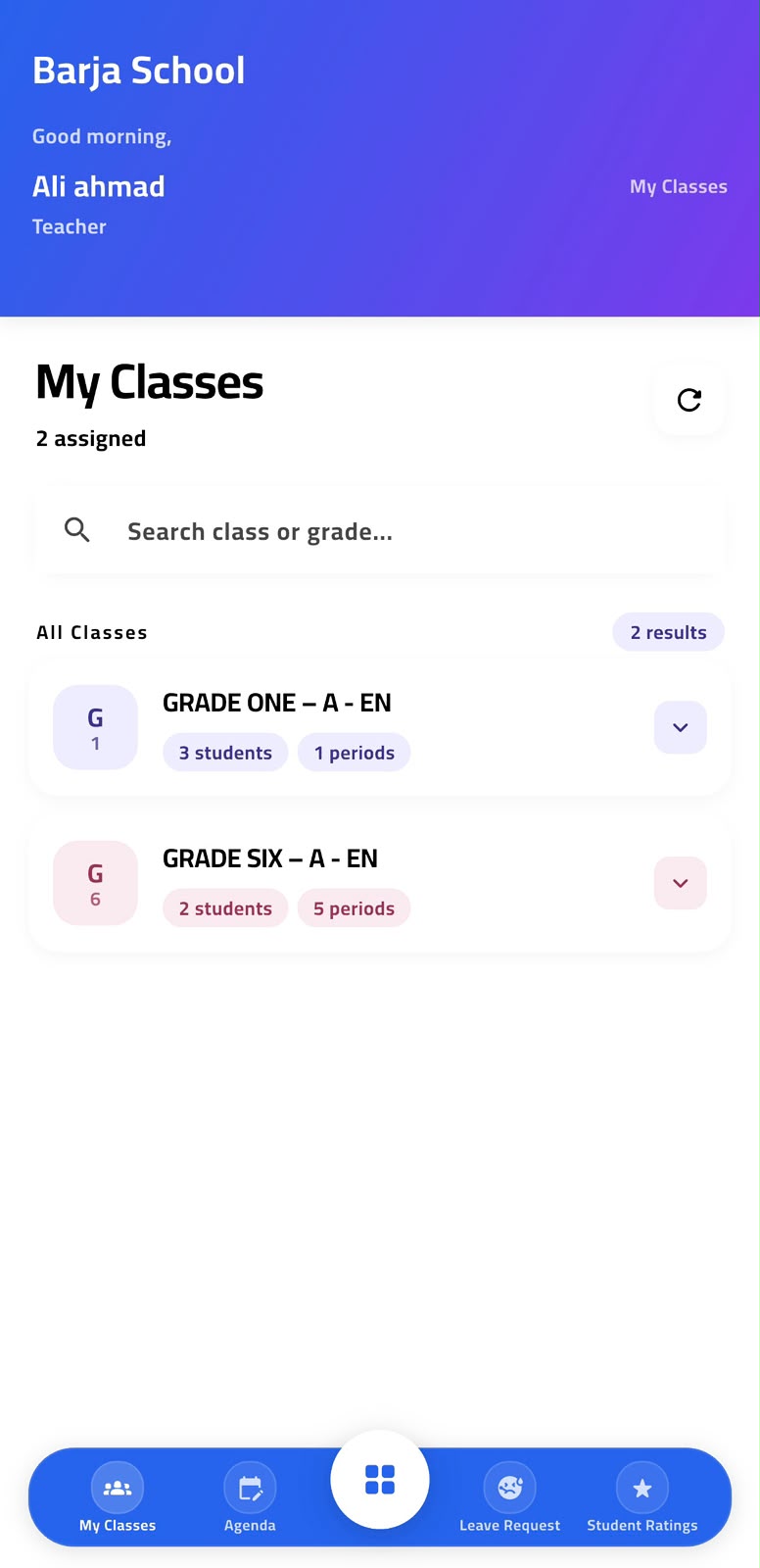
View assigned classes, add agendas, attach files, mark attendance, rate students, request leave.

Parent

One place to stay informed

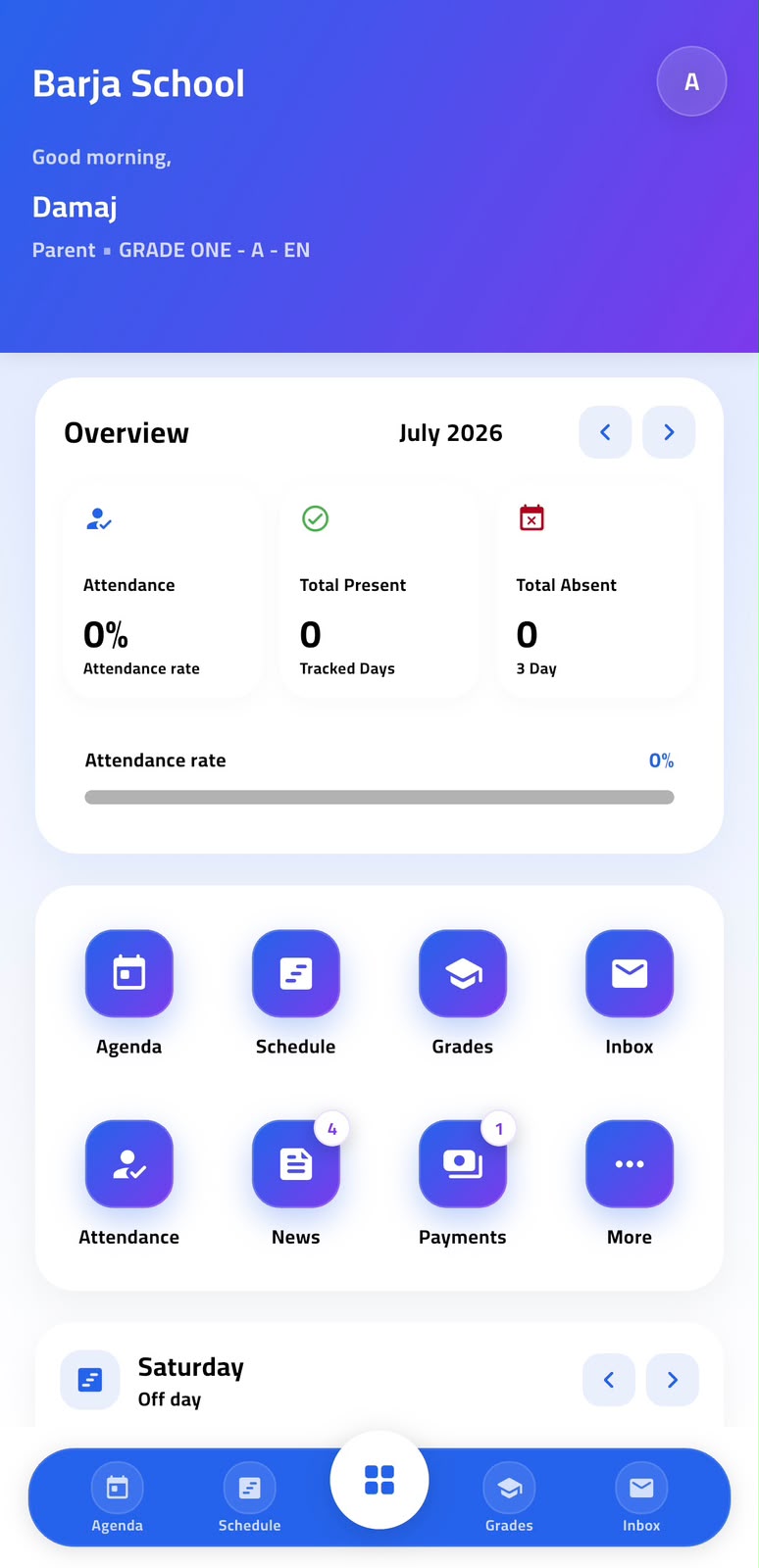
Follow attendance, homework, grades, messages, ratings, announcements, and bus tracking.

Student

A clear view of the day

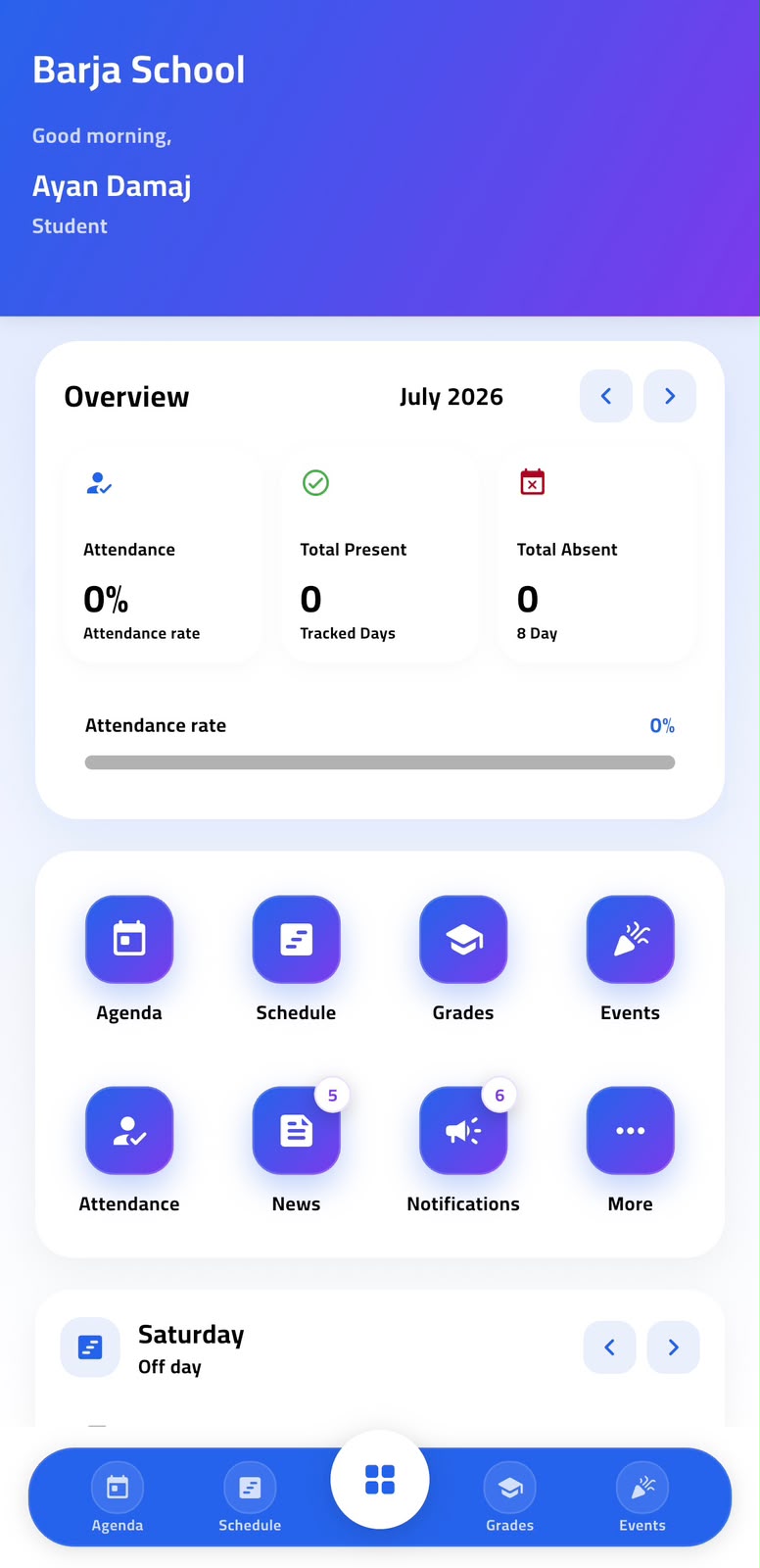
Agenda, homework, schedule, subjects, grades, and school announcements in one feed.

Package

Modules you choose

Turn modules on or off per Basic, Standard, Premium, or Enterprise subscription.

School life

A platform built around the actual school day

From the morning register to the last homework reminder, every role gets a version of Eduync built for what they need to do, not a generic dashboard.

Admins control students, classes, teachers, parents, and settings from one console.
Teachers manage class activity, homework, attendance, ratings, and leave requests.
Parents get updates the moment they happen, with nothing routed through paper.
Students see their schedule, homework, grades, and announcements in one feed.
Teacher and students in classroom
ClassroomTeachers and students, connected day to day
Students learning together
StudentsHomework, schedule, and grades
Teacher helping students
Teacher toolsAgenda, attendance, ratings
One Eduync app

Three roles, the same install

Instead of shipping a separate app for every role, Eduync uses one mobile app with role-based access. After login, it knows whether the user is a teacher, parent, or student — and opens the right screens.

Teacher mode

Assigned classes, subjects, periods, agenda, homework, attendance, ratings, leave requests.

Parent mode

Children overview, inbox, attendance, news, agenda, grades, announcements, bus tracking.

Student mode

Daily schedule, agenda, homework, grades, subjects, announcements, school updates.

Welcome to Eduync Choose your role after login
Teacher dashboard
Agenda, attendance, ratings
Parent dashboard
Children, messages, alerts
Student dashboard
Homework, grades, schedule
One app · Role-based access
Features

Built for every role in the school

Modules designed for admins, teachers, parents, and students — enabled by package.

School dashboard

Real-time overview of operations, users, attendance, and activity.

One mobile app

One app for teachers, parents, and students with role-based screens.

Teacher access

Assigned classes, subjects, agenda, attendance, and student ratings.

Parent access

Attendance, homework, grades, messages, ratings, notifications.

Student access

Agenda, homework, schedule, grades, subjects, announcements.

Attendance

Digital attendance with instant updates for parents and admins.

Agenda & homework

Class agenda, homework, notes, and optional attachments.

Inbox & notifications

Two-way communication between school, teachers, parents, students.

Student ratings

Daily, weekly, and monthly academic and behavior ratings.

Leave requests

Teachers request leave or sick leave, with attached documents.

Attachments

Upload files to agendas, reports, messages, and requests.

Class management

Manage grades, sections, subjects, teachers, students, periods.

Role permissions

Control access for admin, teacher, parent, and student accounts.

UI builder

Customize screens, menu items, theme, colors, and branding.

Multi-language

English, Arabic RTL, and French across all main screens.

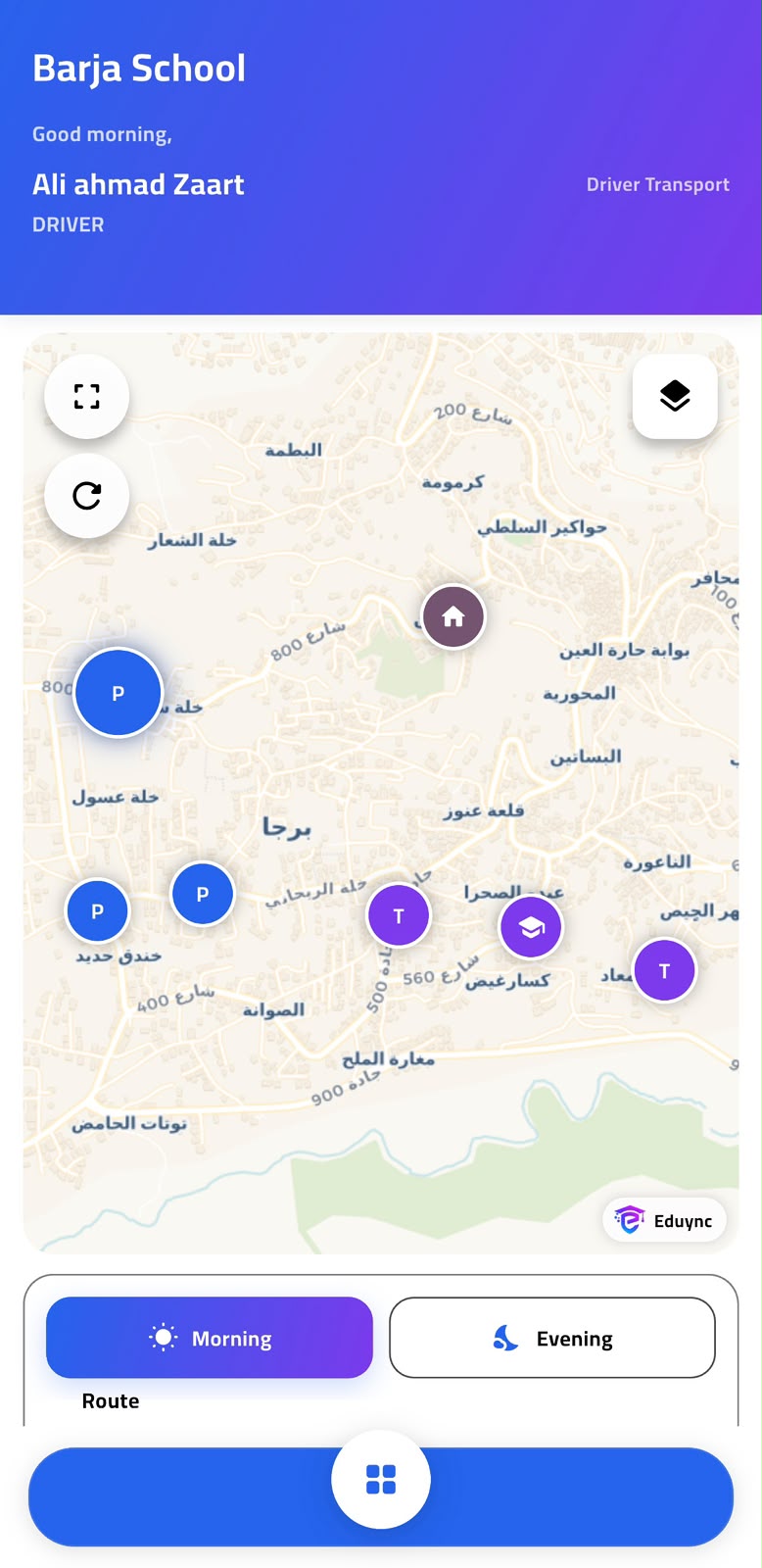
GPS bus tracking

Enterprise schools can let parents track buses and routes live.

Why schools trust it

Built like a real school system, not a simple homework app

Eduync gives schools the control they need before going live: permissions, packages, branding, language support, and separated school data.

Role-based permissions

Admins, teachers, parents, and students see only the dashboards, modules, and records allowed for their role.

Arabic, English, and French

Designed for schools that need multilingual communication, including Arabic RTL support across the main experience.

Package-controlled modules

Turn attendance, agenda attachments, ratings, bus tracking, branding, and advanced reports on or off by package.

Onboarding

Five steps to launch

A straight path from registration to a live school running on one app.

Step 1

Create the account

Register the school and create the main admin account.

Step 2

Choose a package

Select Basic, Standard, Premium, or Enterprise.

Step 3

Add school data

Classes, sections, subjects, teachers, students, parents.

Step 4

Generate access

Create login accounts for teachers, parents, and students.

Step 5

Go live on one app

Each user logs in and sees their own dashboard.

Pricing

A package for every school size

Every package includes the platform and one mobile app. Features scale with the subscription.

Basic
Basic
For small schools starting digital management
$49/mo
  • Up to 300 students
  • 1 admin user
  • One Eduync app access
  • Parent & student login
  • Basic teacher login
  • Classes and sections
  • Basic attendance and agenda
  • Grades overview
  • AR / FR / EN languages
  • Email support
  • Agenda attachments
  • Student ratings
Get Basic
Premium
Premium
For established schools that need advanced control
$279/mo
  • Up to 1,500 students
  • Everything in Standard
  • Sick leave attachments
  • Advanced student reports
  • Daily / weekly / monthly ratings
  • Custom school branding
  • Advanced role permissions
  • Priority support
Choose Premium
Enterprise
Enterprise
For large schools and multi-branch networks
Custom
  • Unlimited students
  • Everything in Premium
  • Multi-branch, one app
  • GPS bus tracking
  • Dedicated account manager
  • Custom reports
  • Urgent support level
  • Optional custom-branded app
Contact sales
Compare plans

Find the right plan for your school

FeatureBasicStandardPremiumEnterprise
Student limit1005001,500Unlimited
Storage2GB4GB6GB10GB+
One Eduync mobile app
Parent app mode
Student app mode
Teacher app mode
AgendaBasicWith attachmentsWith attachmentsWith attachments
Reports
Student ratings
Teacher leave requests
GPS bus tracking
Custom branding
Support levelBasic · 7/7Standard · 12/7Priority · 18/7Urgent · 24/7
App preview

One app, a different view for every role

Teachers, parents, and students share the same Eduync app, each with their own dashboard.

Role-based login
Login systemOne app
TeacherAllowed
ParentAllowed
StudentAllowed
Teacher dashboard
08:00 — Math 8ADone
09:30 — Science 7BNow
11:00 — Math 6CNext
Parent dashboard
Attendance todayPresent
New messages3
Homework due2 tasks
Student dashboard
Today's schedule6 periods
Homework2 pending
Last grade92%
Weekly rating
Behavior4.8
Participation4.2
Homework3.9
Admin dashboard
Students1,248
Attendance94%
Leave requests3 pending
Package builder
Parent modeOn
Teacher modeOn
GPS trackingOff
From schools using Eduync

Built for the way schools actually run

"

Eduync changed how we communicate with parents. Attendance notifications and homework updates are now instant.

Layla Al-Amin
School Principal
"

Teacher mode is simple. I add homework, mark attendance, and rate students from the same app, in one sitting.

Mohammed Rachid
Math Teacher
"

Parents and students no longer need different apps. One Eduync app gives each of them exactly what they need.

Khaled Saleh
School Group Manager
FAQ

Common questions, answered

Do teachers, parents, and students use the same app?+
Yes. Eduync uses one mobile app for teachers, parents, and students. After login, the system checks the user role and opens the correct dashboard and permissions.
Can each school have its own separate account?+
Yes. Eduync is a multi-school platform. Each school has its own isolated data, users, settings, package, and admin console.
Can we control features by package?+
Yes. The package builder lets you enable or disable modules per package — attendance, ratings, teacher access, attachments, GPS tracking, and more.
Does Eduync support Arabic and French?+
Yes. Eduync supports English, Arabic with RTL layout, and French. Users can switch language from the app or console.
Can teachers add agenda entries and attachments?+
Yes. Teachers create agenda entries by class and subject, add homework descriptions, and attach files such as PDFs, images, or documents.
Can parents track the school bus?+
GPS bus tracking is available in the Enterprise package. Parents can view live bus location and get notified when it nears their stop.
Can schools customize the app branding?+
Yes. Premium and Enterprise packages support custom branding, including logo, colors, menu visibility, and UI customization.
Ready to launch

Give your school the app parents will actually open.

Launch Eduync with your logo, your packages, your languages, and one connected experience for the whole school.